




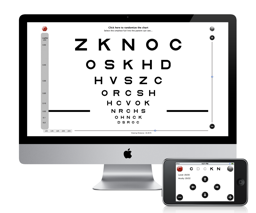
An optional and free companion app VISUAL ACUITY REMOTE (v1.3) for iPad, iPhone and iPod touch is also available to remotely control Mac Visual Acuity to either enter the subject responses when standing a distance away from the Mac display or during self-administration of the test. To learn more about Visual Acuity for Mac, check out the User Guide available online in PDF format.
Visual Acuity for Mac has many features that are welcome in the clinical environment:
- Interactive LogMAR charts
- Randomized design to prevent subjects to memorize the test
- Mirror mode
- Keep track of visual acuity history, subject/patient information and prescription
- Exporting of acuity data through email in HTML format
- Units conversion tool
- Built-in & online PDF documentation
- Free remote control app VISUAL ACUITY REMOTE for iPad, iPhone or iPod touch
Numerous options are also available to customize the acuity testing:
- Simple or ETDRS acuity scoring
- Charts composed either of single letter, single line or multiple lines
- Choice of standard optotypes (Landolt C, Tumbling E, Sloan, HOTV)
- Choice of specialized optotypes (Kid, Numbers, Cyrillic, Snellen)
- Choice of standard acuity units (foot, meter, decimal, VAR, logMAR, cpd)
- Black letter on white background or reverse
- Confusion bars
- 4 or 8 orientations for C and E optotypes
- Distance units and viewing distance up to 8 meters (26 feet)
RELEASE HISTORY
Version 1.3 (January 12, 2021)
- Fix for a crash on macOS 11 (Big Sur),
- Native support for M1 chip found in the MacBook Air, MacBook Pro 13” and Mac mini released in November 2020,
- Fix for the "white on black" option,
- Various cosmetic improvements
Version 1.2 (January 8, 2014)
- Option to black out main screen when presenting charts on external display,
- Various bug fixes with some external display configurations and GPU switching
Version 1.1 (November 30, 2012)
- Compatibility with OSX 10.8,
- Addition of "Mirror" option in Settings,
- Addition of "Kid", "Numbers", "Cyrillic" and "Snellen" optotypes,
- Improvements in Prescription specification,
- Various bug fixes
Version 1.0 (September 26, 2011):
- First release on Mac App Store.